Tag: parenting

  • Should Children Use AI? Five Questions Parents Should Ask First

    Should Children Use AI? Five Questions Parents Should Ask First

    The hardest part of parenting around AI is that the same tool can help a child think or help them avoid thinking.

    It can explain a difficult idea, ask practice questions and help a child explore possibilities. It can also produce the answer, finish the homework and make something look complete before the child has made a meaningful decision.

    That is why “Should children use AI?” is too broad to be useful.

    A better question is:

    What is the child still doing while AI is open?
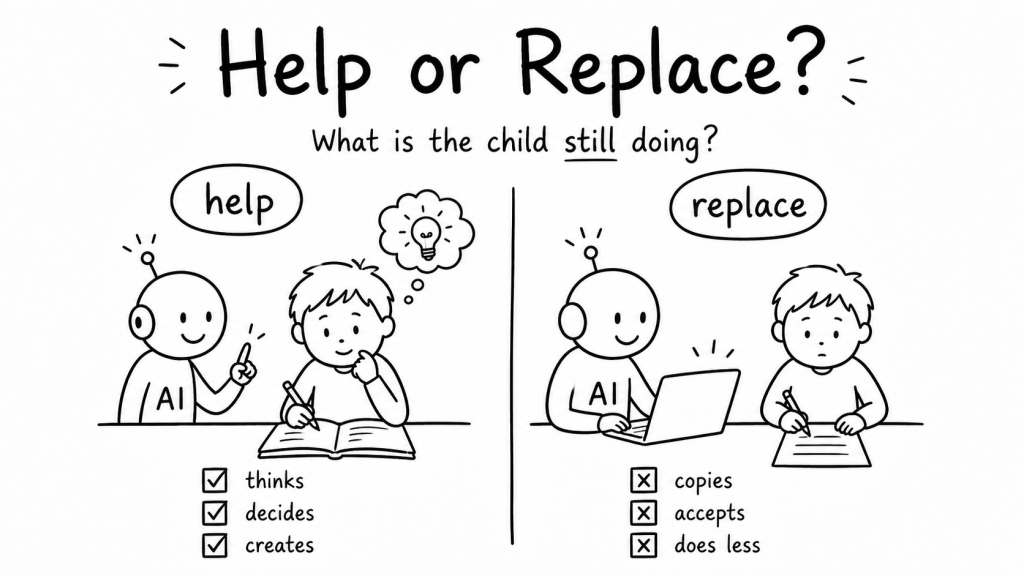
    As a parent and software engineer, I do not think the useful choice is “AI or no AI.” The more practical choice is between AI that supports thinking and AI that replaces it.

    The following five questions turn that principle into something a family can actually use.

    1. Will AI make children lazy?

    AI does not automatically make a child lazy. But it can remove the effort that a particular task was meant to develop.

    Suppose a child asks AI to explain why the sky changes colour at sunset. The tool may help them understand a difficult idea. Now suppose the child asks it to write the explanation, copies the result and submits it. The finished page may look similar, but the learning process is completely different.

    The distinction is not simply whether AI was used. It is whether the child still had to notice, choose, connect or explain.

    A useful test: After using AI, can the child explain the idea without looking at the AI response?

    If the answer is no, the tool may have completed the task without building much understanding.

    2. Should children use AI for homework?

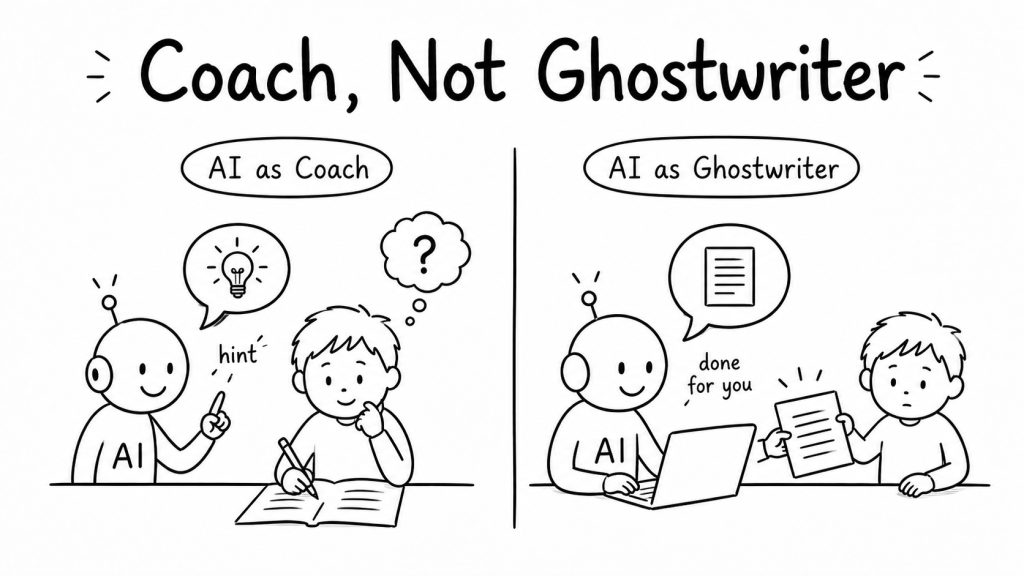
    Yes, in some situations. But AI should act more like a coach than a ghostwriter.

    A coach helps the learner perform the work. A ghostwriter performs the work for them.
    AI as a coach

    • Explain this idea in simpler words.
    • Give me one hint, not the answer.
    • Ask me questions to check what I understand.
    • Review my answer and show me where my reasoning is weak.
    • Give me another example so I can practise.

    AI as a ghostwriter

    • Write my answer.
    • Complete the worksheet.
    • Make the project look finished.
    • Rewrite this so nobody can tell I did not understand it.

    The boundary will vary with the child, the subject and the purpose of the assignment. A spelling exercise and a research project do not require the same kind of effort. The parent’s job is not to ban assistance. It is to protect the part of the task where learning is supposed to happen.

    This connects with a related idea I explored in Use AI to learn faster: the pause before an answer often contains the effort we should be careful not to remove.

    3. Will AI weaken creativity?

    It can weaken creativity when it makes the interesting decisions before the child does.

    Creativity is not only producing a polished picture, story or presentation. It includes choosing a direction, rejecting an obvious idea, combining unrelated things and deciding what feels worth making.

    AI can support that process by offering possibilities. But the child should still shape the result.
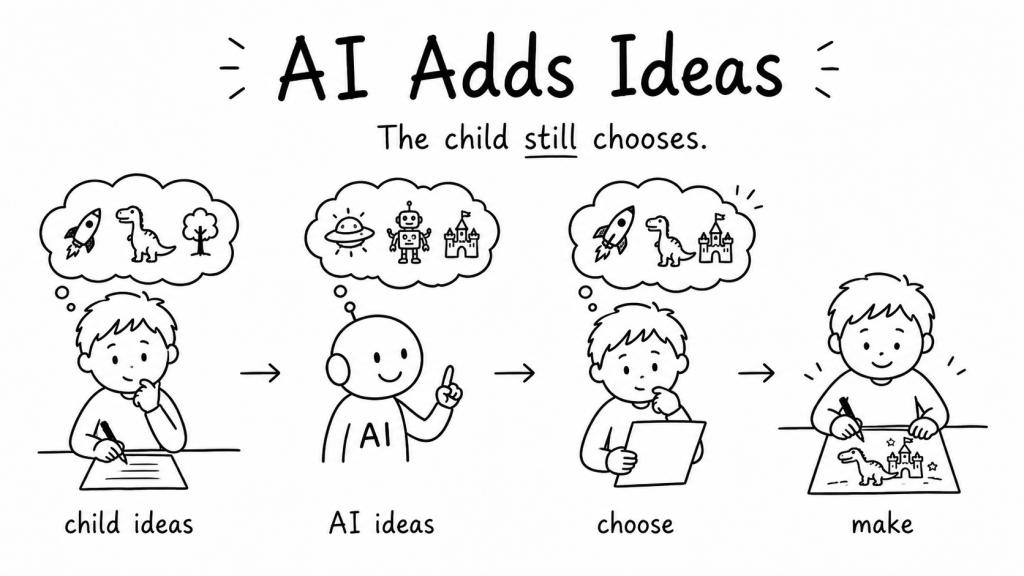
    Try this sequence:

    1. The child creates three ideas first.
    2. AI contributes three more possibilities.
    3. The child compares, combines or rejects them.
    4. The child makes the final version.

    In that sequence, AI expands the option space. It does not own the creative direction.

    4. Is AI safe for children?

    There is no universal yes-or-no answer because AI tools differ, children differ and the context matters.

    UNICEF’s current guidance on AI and children highlights safety, privacy, transparency, inclusion, well-being and preparation for an AI-shaped future. UNESCO’s guidance for generative AI in education also emphasises data privacy, age-appropriate use and human oversight.

    For a parent, those broad principles can become a short checklist:
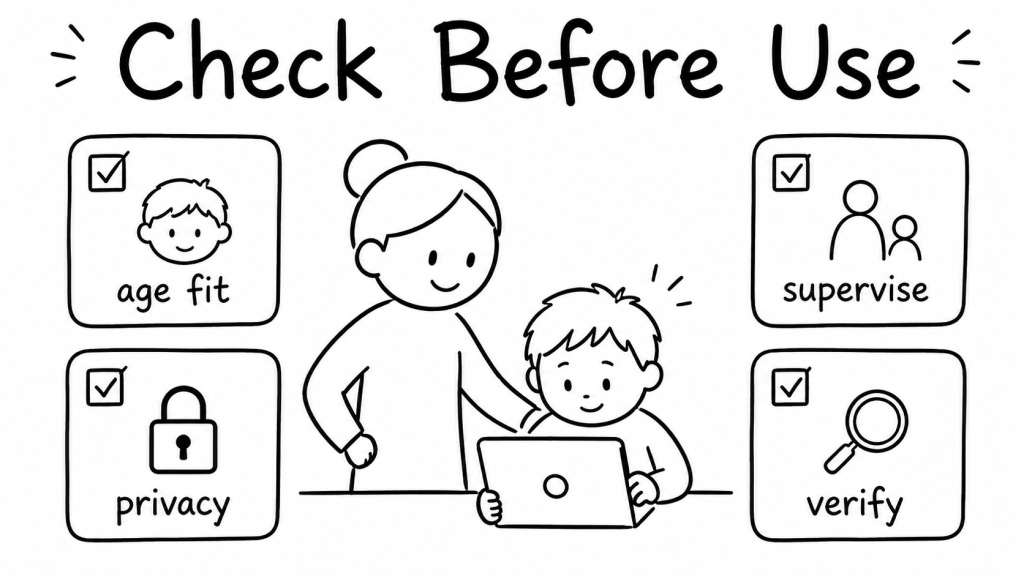
    • Age fit: Check the tool’s minimum-age rules and whether independent use is appropriate for this child.
    • Privacy: Avoid sharing a child’s full name, school, address, private photos, health details or other sensitive information.
    • Supervision: Younger children benefit from using AI with an adult nearby rather than treating the tool as a private authority.
    • Accuracy: Teach children that a confident answer can still be wrong, incomplete or biased.
    • Emotional boundaries: AI should not quietly become the only place a child turns for personal guidance or reassurance.

    The goal is not to make a child frightened of the technology. It is to help them recognise that helpful language on a screen is not the same as judgment, responsibility or care.

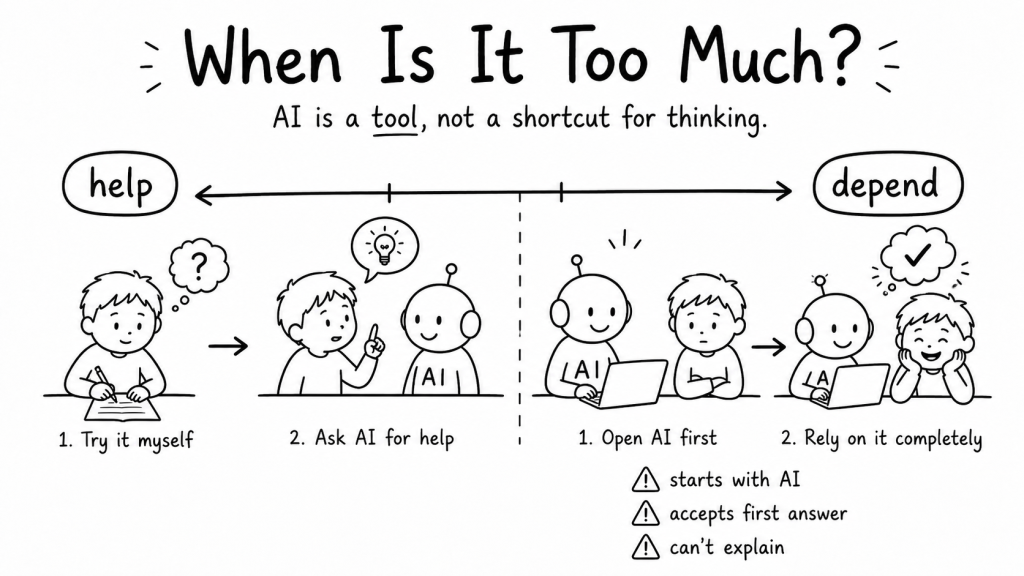
    5. How much AI is too much?

    Minutes alone will not answer this.

    Ten minutes of copying may remove more learning than thirty minutes of questioning, testing and revising. The better measure is not only time. It is dependency.

    AI use may be becoming excessive when a child:

    • opens the tool before trying anything independently
    • accepts the first response without checking it
    • cannot explain what they submitted
    • feels unable to begin without AI
    • uses AI to avoid every moment of confusion or difficulty

    Confusion is not always a problem to eliminate. Sometimes it is the beginning of learning.

    A better parent rule: Think, Create, Question

    Instead of creating a complicated family policy for every possible AI tool, start with three questions:

    Did my child think?

    Did my child create?

    Did my child question?
    “Think” means the child made connections, attempted an answer or explained some reasoning.

    “Create” means the child made meaningful choices rather than simply accepting a generated result.

    “Question” means the child checked, challenged or improved what the tool produced.

    This rule is not a scientific measurement. It is a practical decision aid. It changes the conversation from “Was AI used?” to “What kind of participation did AI leave for the child?”

    A small family experiment

    For one week, do not begin by limiting AI with a fixed number of minutes. Instead, choose one AI-assisted activity and use this sequence:

    1. Before AI: Ask the child to make a first attempt, prediction or idea.
    2. With AI: Use the tool for explanation, questions, feedback or alternatives.
    3. After AI: Ask the child to explain what changed in their thinking.

    You are not trying to catch the child using AI incorrectly. You are helping them notice the difference between receiving an answer and developing an idea.


    The tool is not the final test

    Children will grow up with AI woven into school, work and everyday decisions. Avoiding every use is unlikely to prepare them well. Accepting every use will not prepare them either.

    The more durable skill is learning when to accept help, when to struggle a little longer and when to question the answer in front of them.

    So the next time AI appears in homework or creative play, the first question does not need to be, “How do I stop this?”

    Ask whether the child is still thinking, creating and questioning.

    That is a clearer line than fear. It is also a skill the child can eventually learn to apply without us.

    Further reading

    Fediverse Reactions
  • How to Use AI Without Letting It Do Your Child’s Thinking

    How to Use AI Without Letting It Do Your Child’s Thinking

    AI can make a child’s work faster. The harder question is whether it still leaves enough room for the child to think.

    When I set up a ChatGPT project for my daughter, I nearly created the thing I was worried about.

    It would have been easy to tell it: help with homework. Be useful. Give clear answers.

    But then I pictured her with a hard question in front of her. A blinking cursor. The little pause before she tries something.

    That pause is where a lot of learning happens. It is also one of the first things AI can take away.

    The new question is not screen time

    Every generation had a screen that made parents nervous. Television. Video games. Phones.

    The worry was usually about time. Too much of it. Not enough outside. Not enough real life.

    AI makes the concern feel different. It can sit beside a child while they work. It can explain a maths problem, write a paragraph or make a project look finished before the child has had time to get stuck.

    That is the useful part. It is also the difficult part.

    The question is not only how long a child uses AI. It is what the child still practises while the tool is open.

    A child chooses between asking AI for the answer and working through an unfinished problem with a pencil

    Fast answers can remove useful struggle

    If AI gives the answer first, a child may finish the worksheet faster.

    But they can miss the part where they try, get something wrong and work out what the question is really asking.

    That part looks slow from the outside. It is not wasted time.

    The goal is not to make every task difficult. It is to notice when convenience has removed the exact thinking the task was meant to develop.

    Use the Try → Hint → Explain → Apply sequence

    The instructions I gave the project were not only about being helpful. I wanted it to ask a question back when it could, give a hint before an answer and ask her to explain what she thinks.

    A simple sequence helps keep more of the work with the child:

    1. Try: The child makes a first attempt before asking AI.
    2. Hint: AI gives the smallest useful clue instead of the full solution.
    3. Explain: The child describes the idea or next step in their own words.
    4. Apply: The child uses the idea in a new example, question or small creation.

    This sequence will not work perfectly every time. Some days a child will still want the quick answer. Honestly, so do I. A good tool makes that temptation easy.

    But the sequence creates a useful default. The child remains the person making the attempt and AI becomes the support around it.

    Give AI a learning-coach role

    AI can act like an answer machine. It can also act like a tutor, practice partner or questioner.

    A child or parent can use a prompt like this:

    Help me learn this without doing it for me. First ask what I have already tried. Give one hint at a time. Ask me to explain my thinking before showing a full answer. Then give me a similar example to try on my own.

    The wording is less important than the role. AI should help the child continue thinking rather than end the thinking immediately.

    A child draws a plant while AI responds with a question instead of supplying the finished answer

    Look for what the child is still doing

    There is no simple rule that says more AI is always worse or less AI is always better.

    Watch for the actions that still belong to the child:

    • making a first guess
    • noticing a mistake
    • asking a better question
    • putting an idea into their own words
    • choosing between alternatives
    • trying the idea in a new situation

    A polished answer is not enough evidence by itself. The stronger test is whether the child can explain and use the idea after the screen is closed. I explored that test in Can Your Child Explain the Answer Without AI?

    Try this with one homework question

    Choose one question or topic this week. Before AI gives an answer, ask the child to make a first attempt.

    Then use the four steps:

    1. Ask the child what they already think.
    2. Ask AI for one hint rather than the full answer.
    3. Let the child explain the next step.
    4. Change one detail and ask them to try again.

    Notice what changes. Does the child ask a better question? Spot an error? Explain the idea more clearly? Apply it without looking back at the original answer?

    I do not want my daughter to grow up scared of AI. I want her to recognise when it is helping her think and when it is quietly doing the thinking for her.

    That feels like the job now. Not keeping the tool away. Staying close enough to notice what it is changing.

    Fediverse Reactions
  • Your Child’s Screen Is Not Just Entertaining Them. It Is Teaching Them.

    Your Child’s Screen Is Not Just Entertaining Them. It Is Teaching Them.

    Every app teaches a behaviour.

    A video app teaches a child to keep watching. A game teaches them to keep trying. An AI tool may teach them to question, create—or simply copy.

    The old question

    “How much screen time?”

    The better question

    “What is this screen teaching my child?”

    The same 30 minutes can create three very different habits

    📺 CONSUME

    The screen chooses. The child watches, scrolls and accepts.

    🎨 CREATE

    The child chooses. They make a story, drawing, video, question or tiny project.

    🧠 LEARN

    The child explains, tests, compares and improves what they understand.

    Thirty minutes of scrolling is not the same as thirty minutes of building.

    A simple rule for parents

    Before the screen opens, ask:

    “What will you make, understand or practise before you close it?”

    1. Choose a purpose.
    2. Use the screen or AI as a tool.
    3. Explain what you learned without the tool.

    That last step matters. AI can produce a polished answer without producing understanding. Here is a simple test: ask your child to explain the answer without AI.


    The goal is not less screen. It is better screen.

    Good screen time is not defined by an “educational” label. It is screen time that leaves a child with more curiosity, agency or skill than before.

    Smarter screen time in the age of AI—for parents raising curious kids.